Original AI artwork. Your kind of party.
Halloween costume
party flyer.
A moonlit invitation to a very good night.
Make the words yours. Keep the magic.
One design. A night that feels like you.
A Halloween party flyer
with a little atmosphere.
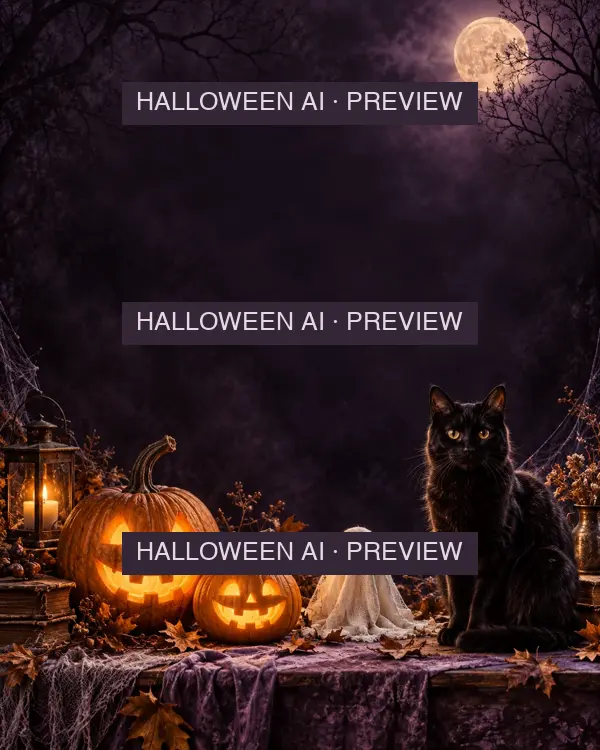
This costume party template pairs candlelit pumpkins, a handmade ghost and a watchful black cat with space for your event details. The illustration sets the mood; your words tell guests where to be.
Use it for a house party, a costume contest or a Halloween gathering. The sample names and venue are fictional. Change them before you share.
Personalize this flyerA different invitation.
Change the copy without spending a new generation.
From a blank plan to a party
How to make your Halloween flyer
Add your details
Give the night a name. Add the date, start time and venue so guests know the plan.
Find your fit
Choose a 4:5 social post or US Letter. The preview updates as you change the words.
Review your quote and unlock
Sign in and review the credit quote for your saved project. Confirm once for clear static exports; editing its words and downloading again cost no extra credits.
Behind the artwork
The Halloween flyer
AI image prompt
Want to make your own background? This is our original prompt, written for this template and used to generate the artwork shown here.
Keep names, dates and small lettering out of the generated image. Add them as editable text afterward, so a venue change does not mean starting over.
The artwork is already generated. New AI background generation inside this site is not available yet.
Made to be shared
Pick a size for
where it’s going.
Unlock your saved project for a clear PNG. For a JPG or flat PDF, continue in the studio. Review the layout after changing size, and leave breathing room around your event details.
| Use | Layout | PNG export |
|---|---|---|
| Social post | 4:5 portrait | 1080 × 1350 px |
| Home printing | US Letter | 1700 × 2200 px |
Original background: 1122 × 1402 px. Larger exports do not create extra image detail. No bleed or crop marks are included.
Before the invitations go out
Halloween party flyer questions
Can I change the words without regenerating the artwork?
Yes. The party name, date, time and venue are separate text layers. Changing them updates the preview without running AI again. Open the studio to move layers, change fonts or add an optional photo.
Is this an AI flyer generator?
The background was made with AI from the published prompt. Editing and watermarked previews are free. Sign in to review a credit quote for a clear export. Generating a new AI background inside this site is not available yet.
What file and size do I get?
After unlocking your saved project, download a PNG: 1080 × 1350 pixels for a social post, or 1700 × 2200 pixels for US Letter. The studio also offers JPG and flat PDF. The original background is 1122 × 1402 pixels; larger exports do not add image detail. Text changes and repeat static downloads for the same unlocked artwork cost no extra credits.
Can I print this Halloween party flyer?
Choose US Letter for an 8.5 × 11 inch layout. Keep essential information away from the edges and check your printer settings. Exports do not include bleed or crop marks; ask a print shop about its requirements before ordering a large run.
Do I need to upload a photo or create an account?
No photo or account is needed to edit and see a watermarked preview. Clear exports require signing in, saving a project and reviewing its credit quote. Credits are only charged after you confirm. Reopening the same unlocked project, changing its words and downloading again do not incur another charge.
Can I use a different name, date or venue?
Yes. Midnight Masquerade and The Moonlit Manor are sample wording, not a real event listing. Replace them with your event details. Times are shown as entered, so make the venue’s local time zone clear to your guests.
Set the mood.
Then set the date.
Make your party flyer Original AI artwork. Event details you can change.